
This endpoint is used to save the network settings of the specified device. Note that these settings will be published to the device and, once the device receives and saves the settings, the settings in the Alocity system will be updated.
CAUTION!Exercise caution when changing the network settings for a device. If the network settings are incorrect, your device will not be able to connect to the network and you will not be able to change the network settings again using this endpoint.
To revert the device back to using DHCP, hold the reset button on the back of the device for 15 seconds. The device will begin flashing with a green light and the device will be reverted back to factory settings. You will need to set up the settings for the device again if you changed anything from the defaults.
The values entered when using a static IP must fall within the following bounds:
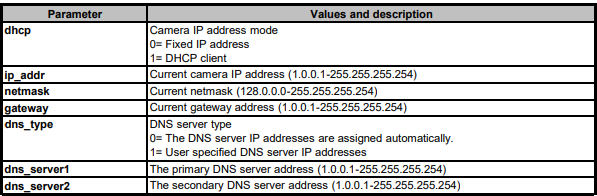
The DNS type will automatically be set to 1 if you choose to use a static IP and both DNS servers will be set to the value specified in the dns_server field.
Controlled Errors
| Error Code | Error Message |
|---|---|
| error_device_not_found | No device was found. |
| error_device_network_setting | The address provided for the IP address, netmask, or default gateway is not in the correct format. |
Any status codes returned that are not provided here are generic status codes that can be found here.